Prompts
Flying Roadster AI video prompts and camera angles
A flying Roadster AI video prompt is not a script for a fixed video. It is a set of instructions that nudges a stochastic model. The same prompt, the same photo and the same settings can produce two different clips. The wheels may change, the body may stretch, and the car may land differently.
That randomness is the first thing to plan for. A prompt can make a good result more likely. It cannot guarantee one. If you need a specific output for a client or a post, run more than one attempt and keep the best result.
This guide covers the prompt structure, the settings that should stay out of the prompt, the camera angles that matter, and the failures you can diagnose. It is written for a general image-to-video or video-reference tool.
What a flying Roadster AI video prompt can control
- The subject. Use the uploaded car as the hero vehicle and preserve its paint, wheels and body shape.
- The action. Climb the ramp, launch, rotate, land.
- The camera. Keep the reference camera movement and framing.
- The exclusions. No extra cars, people, text, logos, watermarks or new stunts.
The prompt cannot guarantee an exact likeness, a perfect wheel count or a specific landing pose. Those are model limitations, not wording problems. If the source photo is blurry, the prompt cannot recover the missing detail.
Put these in the settings, not the prompt
| Setting | Why it does not belong in the prompt |
|---|---|
| 9:16 vertical | The request already defines the frame; repeating it can conflict. |
| 10 seconds (5 seconds for short templates) | Duration is a request parameter; a different number in the prompt is a second instruction. |
| 720p | Resolution is chosen in the tool, not generated from text. |
| Audio on or off | The audio path depends on the model and the request, not the prompt. |
Pick one place for each parameter. If the tool asks for a duration and the prompt says “15 seconds” while the request says 10, the model has two instructions. The result is less predictable, not more.
A flying Roadster AI video prompt structure
Use four parts: subject, reference, action, consistency. Here is a generic version for a video-reference tool:
Use the uploaded photo as the exact hero car. Preserve its paint,
wheels, body shape and distinctive details. Use the reference video for
the scene, camera movement and action. Replace only the hero vehicle.
Keep the car consistent through the shot. Do not add text, logos,
watermarks, extra vehicles, people or new stunts.
For an image-to-video tool without a video reference, the prompt has to describe the action:
Use the uploaded photo as the exact hero car. The car accelerates
toward a curved ramp, launches into the air, rotates slightly and lands
on the road. Keep a fixed low camera angle, natural night lighting,
subtle tire smoke and the same car throughout. No people, collisions,
text, logos, watermarks or extra vehicles.
The second prompt can produce a flying-car clip, but it will not reproduce a specific reference clip's camera path. If you need the exact ramp motion, use a video reference.
Front, rear and two-image setups
The camera angle is the most common reason a ramp video looks wrong. The reference starts with the car's rear facing the camera. A front image can make the model keep the front facing the camera and reverse the car up the ramp.
- Front image only: good for identity, risky for a rear-approach ramp. Do not expect the model to infer the turn.
- Rear three-quarter image: the safest single-image input for the ramp approach. You lose some front detail at the landing.
- Two images: use the front image for identity and the landing, and a rear three-quarter image for the approach. Tell the model which image is which, and that both are the same car.
If you have access to the car, a real rear three-quarter photo gives the model details that a front view cannot show. Check that both photos show the same paint and wheels.
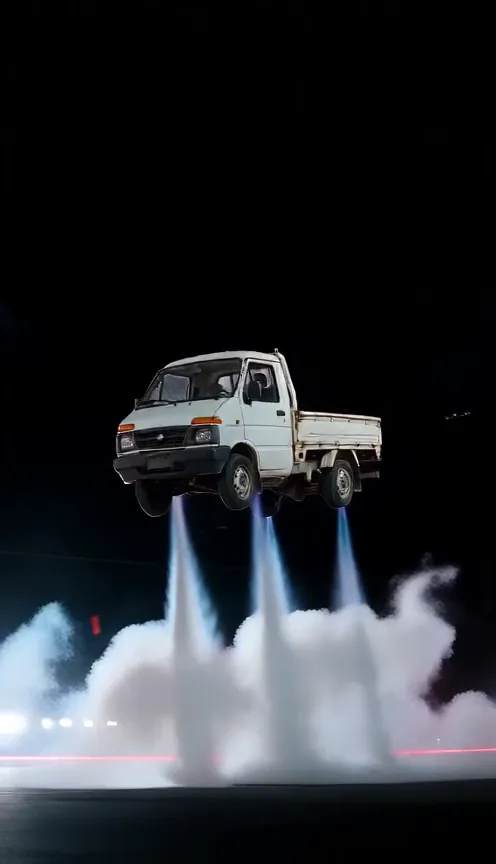
The flying Roadster reference matters
A prompt cannot fix a bad reference. If the reference clip has a watermark, a cut, a low-resolution car or a camera that loses the vehicle, the model will carry those problems into the output. The first frame needs to show the car clearly, and the clip needs enough room for the action to finish.
Match the requested duration to the reference. If the clip contains a five-second fragment, asking for a much longer output can make the model loop, slow down or invent a second action. A small overlap is usually workable; asking a model to extend well beyond the reference is where failures start.
Check the audio path separately. A video model may generate a silent clip, a clip with ambient sound, or a clip with a soundtrack inherited from the reference. Decide what you want before you generate, and inspect the downloaded file rather than the preview.
Why the same flying Roadster AI video prompt changes
Video models sample from a distribution. The seed, the model version, the input resolution and small differences in the photo can change the output. Some tools let you set a seed; even then, a different model version or a different reference can change the result.
Do not chase an exact frame. Decide which properties must hold — the car's paint, the wheel count, the direction, the landing — and accept variation in the rest. Run two or three attempts, compare only the properties that matter, and keep the best clip.
If you change the photo, prompt and duration at the same time, you cannot tell which change helped. Change one variable per run. That is slower, but it gives you a usable diagnosis.
Common failures and what to change
| Symptom | First thing to check |
|---|---|
| The car reverses up the ramp | The input angle. Use a rear three-quarter image or a two-image setup. |
| Wheels change shape or count | The source photo. Use a sharper, full-car image; avoid extreme crops. |
| The body melts or stretches | Too much motion or a low-quality source. Simplify the scene and keep the reference action. |
| An extra car or person appears | The reference and the exclusions. State “no extra vehicles or people” and check the reference frame. |
| The clip cuts or restarts | Duration mismatch. Match the requested duration to the reference; do not stretch a short reference well beyond its length. |
| Text or a watermark appears | The reference. Use a clean source; a prompt alone rarely removes a watermark. |
| The car looks like a different model | The source photo and any second reference. Use one car and enough visible detail. |
What to check in a flying Roadster AI video
- Direction: the car approaches with its rear toward the camera, not reversing up the ramp.
- Wheels: four wheels, round and attached, throughout the shot.
- Body: no melting panels, stretched roof or extra doors.
- Landing: the car does not sink into the ground or pass through another vehicle.
- Text: no unexpected watermarks, number plates or brand marks.
- Audio: if sound was generated, it matches the action; if not, add it in an editor.
Do you need a prompt on our site?
The flying Roadster AI video template uses one car photo with no prompt field or model selection. This guide is for people using a general tool who want to control the prompt themselves.
For the full DIY workflow, read how to make a flying car video from one photo.
Questions
Should I put aspect ratio and duration in the prompt?
No. Aspect ratio, duration and resolution are request settings. Putting them in the prompt adds noise and can conflict with the model settings.
Why do I get a different result every time?
Video generation is stochastic. The model's sampling, the seed and small differences in the input can change the wheels, body shape, motion and landing. The same prompt is not a guarantee of the same output.
Do I need a rear photo for the ramp?
If you are prompting a general video tool, a front-only photo can make the car reverse up the ramp. Use a rear three-quarter reference, or two images of the same car: front for the landing, rear for the approach.
Can a prompt guarantee the car's exact details?
No. A prompt can ask the model to preserve paint, wheels and body shape, but AI output varies. Check the wheels, badges, body panels and direction before posting.
See the flying Roadster AI video templates · Compare 5s and 10s pricing
Make your own ramp video
Choose a template, aspect ratio and car photo on the main page.
Set up your video